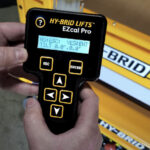
Having an issue that is difficult to diagnose? Saving the controller data from your machine allows our Product Support team to review fault information, settings, adjustments, and other diagnostic details that may help identify the cause.
For the most useful results, the controller data should be saved while the fault is active or immediately after it occurs. Avoid cycling power or clearing the fault before saving the file, if possible.
Prepare the EZcalPro Before Reproducing the Fault
If the issue is intermittent, prepare the EZcalPro in advance so you can save the data as soon as the fault occurs.
- Connect the EZcalPro and access the SAVE menu.
- Enter an appropriate filename. Press UP/DOWN to change each character and LEFT/RIGHT to move between characters.
- Press ENTER when the filename is correct.
- The EZcalPro will display “:NO” after the filename. Press UP/DOWN until “:YES” is displayed.
- Leave the EZcalPro on this screen, ready to begin the save.
Reproduce the Issue and Save the Data
Operate the machine as you normally would when the fault occurs, following all standard safety procedures.
Once the unit enters the fault condition, safely stop operating the machine and press ENTER on the EZcalPro as soon as possible. Do not cycle power or clear the fault before saving unless required for safety.
The EZcalPro will create the file in USB storage, read the controller data, and write it to the file. This process may take 30 seconds or longer.
The display will show the information being saved, including:
- DIAGNOSTICS
- ADJUSTMENTS
- SETUPS
- Other controller data
When the display shows “OK,” press ESC to exit the SAVE menu.
Send the File to Product Support
Once the file has been saved, use the link below to create a service case. Please include:
- The machine’s serial number
- A description of the issue
- What the machine was doing when the fault occurred
- Any fault codes or messages displayed
- The controller data file from the EZcalPro
The more detail you provide, the better our Product Support team can understand the issue and assist with diagnosis.